
About the developer & the idea
Duplicate timing work became a tool built around precision, control, and safety.
Precision, control, and safety.
I release my own music as Palkas Universe and regularly use DistroKid to publish on several streaming platforms. I liked its synced-lyrics workflow from the start: every line can be given a precise beginning and end against the music.
Across several songs, however, this simple task quickly becomes exhausting. You have to listen attentively for the whole track and react at exactly the right moments. A line that lands far too early or late near the end is especially frustrating when an otherwise clean run then has to be repeated.
For my YouTube releases I already create precise SRT files containing those same start and end times. That led to the obvious question: why create the same timings manually a second time?
That idea became Palkas Universe SRT Sync. Practical testing added controlled rewinds, corrections, keyboard protection, local verification, and the fail-safe. Automation should remove work without taking control of the result away from the user.
Complete feature set
What the extension can do
From local import to confirmed completion, this section covers the complete feature set of the currently available version as well as additions planned for the upcoming version. You can see which functions are already publicly available in the development history.Read and validate SRT locally
The selected SRT is processed entirely in your browser. Cues, lyrics, file name, time ranges, line count and word count are detected without changing the original file.
- One SRT for both tasks
- Original cues and timestamps remain unchanged
- Status with line and word counts
Create format-checked plain lyrics
Every cue becomes exactly one lyrics line. Line beginnings are capitalised, quotation marks are removed and invalid punctuation at the end of a line is cleaned.
- Question and exclamation marks are preserved
- Trailing periods, commas, colons, semicolons and ellipses are removed
- Punctuation inside a line is preserved
Handle language and apostrophes sensibly
Text language is detected locally. German word apostrophes are removed and ignored during matching, while forms such as “don’t” or “I’m” remain intact in non-German text.
- German forms such as war’n → warn
- The original SRT remains unchanged
- German and English interface languages
Preview, copy and insert directly
The cleaned text remains fully visible before use. An explicit click can write it to the clipboard or place it directly into DistroKid’s current lyrics field.
- Clipboard write only—never clipboard read
- Robust detection of the visible input field
- Input and change events for the page editor
Synchronise existing SRT timestamps
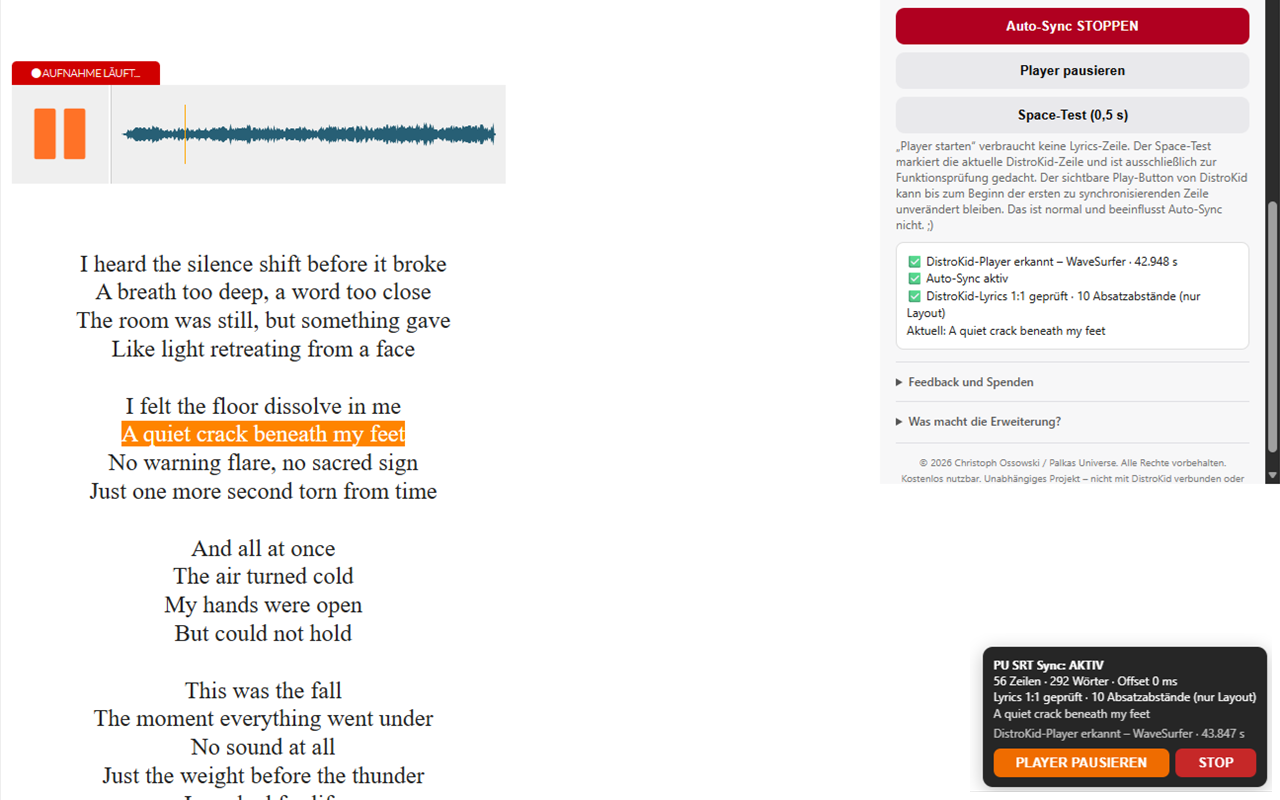
In the Synced Lyrics Editor, the current player position is compared with existing cue times. Space is pressed at the line start and released at the effective line end.
- One cue → exactly one DistroKid line
- If the next cue overlaps, the current DistroKid line ends when the next one starts
- The original SRT and its timestamps remain unchanged
Detect the real DistroKid player
A local page bridge detects the active WaveSurfer instance and prefers its real time as the timing master. Visible audio or video elements remain available as a fallback.
- Playing/paused state and current time
- Pausing inside an active cue safely discards its partial marking
- Pausing in an instrumental gap preserves that position
Match lyrics strictly 1:1
The extension reconstructs visible DistroKid lines from their word elements and compares them with the SRT in the real DOM order.
- Invisible measurement copies are excluded
- Paragraph gaps are layout only and send no space event
- Repeated consecutive lines remain individually mapped
Fail-safe before and during the run
Auto-sync starts only after a complete match and checks again before every cue. Any mismatch immediately releases Space, pauses the player and disables auto-sync.
- Last correct line in green, conflicting next line in red
- Line number, text and time span in the message
- “Reveal issue” marks and centres the location again
On-page control window
During synchronisation, a small window shows player state, time, SRT progress and the current lyrics line. Active start and end offsets appear only when their value is not 0 ms.
- Start or pause the player
- Unambiguous “Stop auto-sync” button
- Also displays fail-safe and completion information
Block accidental sync keys
While auto-sync is active, a local keyboard guard intercepts genuine manual Space and Backspace input before DistroKid can handle it. Sync signals generated by the extension remain explicitly allowed.
- Remains active while the player is paused
- Turns off automatically on stop, fail-safe and completion
- Visible protection status and brief feedback after a blocked input
Return directly to synchronised lines
A sync history lists completed lines. One click resets only later DistroKid markings and resumes both audio and synchronisation exactly at the selected line’s SRT start.
- Current line shown in grey and still locked
- All required Backspace presses in one controlled operation
- Auto-scroll pauses while reading and resumes after leaving
Keep an interactive waveform in view
A fixed mini waveform at the bottom left shows real audio data, current time, target time and total duration. Backward and forward seeks are mapped to safe, complete SRT lines.
- Clickable while playing or paused
- Large and mirrored waveforms remain parallel controls
- Incomplete lines cannot be skipped
Resume audio and lyrics together after a fix
If the fail-safe stops on a mismatching line, a corrected SRT resumes audio and DistroKid progress together with a one-line safety buffer.
- One previously synchronised line is completely reset
- Restart exactly at that line’s possibly corrected cue start
- A mismatching cue count or Clear safely discards the point
Fully follow DistroKid’s reset action
Clicking DistroKid’s own reset link returns the audio, internal sync progress, sync history, and verification log to 0 together. The player pauses safely at the beginning.
- No stale progress with restarted audio
- Auto-Sync remains ready for the next start
- Completion lock is released again
Confirm DistroKid’s actual completion state
Only DistroKid’s visible save state confirms a completed run. Start and seek actions are then locked until reload, and a manually closable thank-you window appears.
- No accidental second start
- Direct feedback, YouTube, support and changelog links
- No automatic saving or submission
Verify the executed sync locally
After completion, an explicitly selected local audio file can be played. The SRT target, the Space timings emitted by the extension, and the begin/end values actually accepted by DistroKid’s editor appear together with their millisecond differences.
- Colour legend: green up to 40 ms, yellow at 41–80 ms, and red above 80 ms; it evaluates the SRT deviation remaining after the active offset has taken effect
- Overlaps are labelled as a DistroKid adaptation rather than an SRT error
- Gaps over five seconds receive a time-accurate progress bar and countdown
Keep work state locally
SRT evaluation, generated plain text, timestamps, start/end offsets, language and auto-sync state stay in local extension storage so page changes do not discard the work state.
- Clear resets SRT work data, both offsets and markers
- The selected interface language is preserved
- No cloud synchronisation by the extension
Bilingual help and clear feedback
The popup, quick guide, status messages, errors and control window are available in German and English.
- Switch language directly in the popup
- Guidance for both workflows
- After an installed update, the release notes and feature guide open once
Minimal access
The extension requires only local storage, clipboard write access and page access limited to DistroKid and its subdomains.
- No tracking or advertising
- No remotely loaded executable code
- No transmission of SRT or lyrics data
The workflow
From SRT to final review
Select the SRT
The file is read locally, checked and prepared as plain lyrics.
Review plain lyrics
Check the preview, then copy the text or insert it directly into DistroKid.
Open Synced Lyrics
Start the DistroKid player once, verify the 1:1 match and enable auto-sync.
Review the result
Observe the synchronisation and save at DistroKid only after your own final check.
Palkas Universe Lyrics Studio
Your text. Precisely synchronized.
Use the free Lyrics Studio to synchronize and style text for commentary, tutorials, dialogue or music. For DistroKid, export your song lyrics as SRT and transfer them with SRT Sync. Locally in your browser, without an account or uploading your work files.Open Lyrics StudioContinue with existing files
Load SRT, VTT, LRC or TXT and keep working with existing text and timestamps instead of starting again.
Synchronise directly to the audio
Place each line during rough synchronisation, then refine its exact beginning and end in the fine-tuning timeline.
Export for SRT Sync
Download the finished SRT and use the browser extension to transfer its reviewed timestamps into DistroKid.
Technical conditions
What can affect timing precision
Auto-sync transfers the existing SRT timestamps unchanged. The exact moment at which a browser can execute the matching keyboard signal can also be influenced slightly by its current scheduling cadence.System load
Most likely external influenceHeavily loaded CPU or browser processes can cause JavaScript tasks and player samples to run later. Compute-intensive games, video exports, scans, heavily loaded tabs, or an active energy-saving mode are therefore more relevant than the normal extension interface. Memory mainly has an indirect effect when the system already needs to swap data to disk.
Display refresh rate
Small technically possible influenceThe sync check also uses the browser cadence associated with rendering. One frame takes about 16.67 ms at 60 Hz, 8.33 ms at 120 Hz, and 6.94 ms at 144 Hz. DistroKid player time is currently sampled about every 30 ms, so a higher refresh rate may refine the response slightly but is not normally the decisive limit.
Extension windows
No measurable disadvantage in the practical testThe small displays update only the elements that changed and do not rebuild the entire page for every value. In a 76-line test that was not intended as a scientific benchmark, visible and hidden windows both produced an average technical residual of about 20 ms; every line remained green.
Separate timing calibration
Start and end now have their own offset
The start offset shifts the Space key press; the end offset shifts its release. Positive values act later and negative values earlier. The extension evaluates the begin and end values retained by DistroKid’s visible editor separately, so a good line ending does not have to move because its beginning differs—and vice versa.01
Start offset · press Space
Only confirmed begin values are compared with the corresponding SRT line start. The robust start recommendation changes only the beginning of the line and is also used as the timing basis for safe rewinds.
02
End offset · release Space
Confirmed end values are compared independently with the effective SRT line end. The adjusted end is never allowed to extend beyond the adjusted beginning of the next line; a measurement capped there is excluded from the end recommendation.
New in version 1.2.2Download DistroKid’s SRT directlyAfter saving, a download window appears in the bottom-right corner. Simply click “Download SRT”.Show stepsHide steps
- 1
Synchronize and save
Synchronize your lyrics as usual and deliberately save the result using DistroKid’s save button.
- 2
Find the window at the bottom right
Once DistroKid confirms a successful save and provides the export data, the “Download DistroKid SRT” window appears in the bottom-right corner.
- 3
Click “Download SRT”
The extension retrieves and downloads DistroKid’s own SRT output. No developer tools, console code or manually copied hash are needed.
If retrieval fails, you can retry in the window. Downloading does not change your lyrics or timings.
Deliberately well-defined
What the extension does not do
These boundaries are intentional: the workflow stays transparent and you retain final control.No audio or speech recognition
The extension does not transcribe recordings or generate lyrics from audio.
No timestamp creation
It uses existing SRT timestamps but does not create or automatically change them.
No automatic final action
It does not upload, save or finally submit anything to DistroKid on its own.
No data transmission
Lyrics and SRT content are not sent to Palkas Universe or other external services.
No replacement for your account
You need your own DistroKid account and a correctly prepared SRT file.
No DistroKid affiliation
This is an independent project and is not affiliated with or endorsed by DistroKid.
Processed locally
SRT, plain lyrics and matching are processed on your device.
Stored selectively
Only work state and settings are kept in local extension storage.
Triggered by you
Copy, insert, start, stop and save remain deliberate user actions.
Available now
Palkas Universe Lyrics Studio is here.
Open plain lyrics, SRT, LRC, VTT, or TXT directly in your browser, synchronize and refine every line on a precise timeline, then export the latest edited state in the format that fits your destination. WebVTT placement and simple formatting can also be designed line by line.No account or installation is required. Audio, lyrics, fonts, and preview images remain local in your browser.Two tools. One dream. For all musicians.Open Lyrics StudioRequirements for SRT Sync
What you need
Your own DistroKid account
Sign-in, songs and final saving remain in your personal account. Synced Lyrics also require a DistroKid plan or add-on that enables the feature. Without that access, preparation and transfer of format-compliant plain lyrics remain available. The extension does not add or bypass account capabilities.
A prepared SRT file
Lyrics, order, start times, and end times must already exist and be checked against the song. The SRT can come from YouTube, subtitle software, or another suitable tool; dependable timestamps are what matter.
Google Chrome or Microsoft Edge
Install the extension from the appropriate official store. After installation or an update, reload any DistroKid page that was already open.
Questions, feedback or optional support?
The extension is provided free of charge. Feedback helps its continued development.